

I’ve been fortunate enough to dev with Angular for the last 2 years, and I’m always pleasantly surprised when the framework makes my life easier with build in methods or configurations.
One such configuration set is the Router ExtraOptions configurations. These are applied to the Router Module and I’m going to go through a few that I have used and found very helpful.
Jumping to Anchor Tags
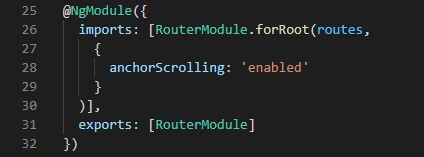
If you want the user to jump to a specific place on a page, add the anchorScrolling property to the .forRoot method in your routing module file, like so:
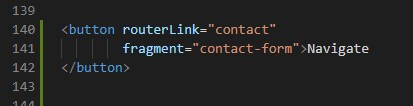
Next you would most likely want to set an offset when jumping to an anchor tag. This we do next.
Adding a Scroll offset
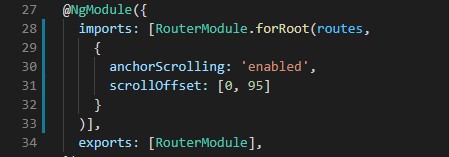
If you find your div is partially disappearing behind a fixed header, you might want to add an offset to the top of the page when scrolling to an anchor. This can sometimes be tricky with css and not work as well as expected. Here the scrollOffset property works quick and easy:
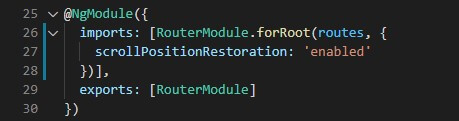
Restoring the page scroll position
In older versions of Angular, like version 8, this configuration is not enabled by default. In the case that you are using that version or older, simply adding the scrollPositionRestoration property to your route configuration will force the page to shoot back to the top every time a user navigates backwards.
Reloading the same URL
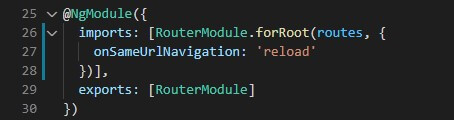
If you have a situation where you want the page to reload when the same URL is provided to the browser (by default Angular ignores reloading the same URL), Angular has you covered. Sometimes reloading the same page is necessary because you might want to invoke your ngOninit method in order to trigger a refresh feature.
Adding the onSameUrlNavigation property will force the framework to reload the page for you in turn running your logic.