





JavaScript is a programming language that can be used to extend the functionality of the front end of your website. It can change the way your webpage behaves, from updating form values to changing the background of an element when you hover over it.
In the below example, we’ll have a table and a label. When a user clicks on a table value, it will update the label with that table value.
Setup
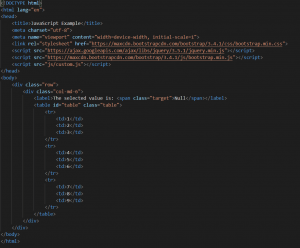
To start, what we’ll need to do is set up our web page. I’ve created a basic one, as can be seen below. Something to take note of is the script tag we’re using to add jquery.min.js to our page, as well as the js/custom.js file where we’ve put out JavaScript.
JavaScript
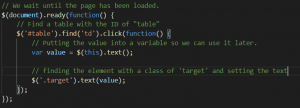
Now that we have our web page set up, we can move on to the Javascript. The below is the js/custom.js.
In the below example, we’ve wrapped our code in a document.ready() function. This is to ensure that the code only runs once the page is ready.
Next, we find a table with the id of table, and bind a click even to every td inside of that table. Once a td is clicked, we take the text inside of it and set the text of the label above it.
Conclusion
This example shows you how to select an element, get data from it, and update a different value. Updating a value is one of the most common uses for JavaScript. That being said, there is so much more to learn when it comes to JavaScript. Hopefully, the above will be helpful when you want to get started.


