





When creating a screen that allows a user to interact with data, you will need to be mindful how the user will interact with data and how long it will take.
If the database starts building up, it will become more time-consuming for the user to manage the data. The solution for this issue is to implement a bulk functionality for the datatable.
In this blog, I will be giving some tips and tricks on how to implement a bulk delete and edit for your datatable on PHP Laravel projects.
Index
1. Implementing a DataTable:
To explain it simply, DataTables (https://datatables.net/) is a JavaScript library that adds interactive elements to HTML tables, making it easier to implement than normal HTML tables.
There are many ways you can install DataTables to your project, but the easiest implementation would be implementing the following code on the app.blade:
<link rel="stylesheet" type="text/css" href="https://lavalamplab.b-cdn.net/DataTables/datatables.css">

<script type="text/javascript" charset="utf8" src="https://lavalamplab.b-cdn.net/DataTables/datatables.js"></script>
app.blade
<script type="text/javascript">

    $(function() {

        $('[data-toggle="tooltip"]').tooltip();

        $('li.paginate_button:not(.active)').click(function() {

            setTimeout(() => {

                $('[data-toggle="tooltip"]').tooltip();

            }, 1500);

        });

    });

    $.noConflict();

    jQuery(document).ready(function($) {

        $('#contacts-form').DataTable({

            pageLength: 10,

            lengthMenu: [10, 20, 50, 100, 200, 500],

            pagingType: "numbers",

            paging: true,

            searching: true,

            "processing": true,

            "orderClasses": true,

            ordering: true,

            "order": [

            [1, "asc"]

            ],

            pagingType: "full_numbers",

            language: {

            searchPlaceholder: "Search",

            search: "",

            },

            "initComplete": function() {

                $("#contacts-form").show();

                $("#contact_delete_button").show();

                $("#contact_update_button").show();

            }

        });

    }

    });

</script>
Once the code above has been implemented, you will need to start adding the table to your .blade file. In the following code, you will need to ensure that your action buttons and checkboxes are correctly implemented for the bulk functionality to work:
index.blade
@extends('layouts.app')

@section('content')

<div class="container">

    <div class="row justify-content-center">


        <br />

        <div class="col-md-12 z-bottom">

            <div class="tab-content">

                <div  class="tab-pane fade in active show tab-box">

                    <div class="card">

                        <div class="row">

                            <div class="col-md-12 no-padding">

                                <div class="card-body">

                                    <div class="col-3">

                                        <h3 class="float-left table-heading">Your Contacts</h3>

                                    </div>

                                    <br />

                                    <table id="contacts-form" class="table table-hover">

                                        <thead>

                                            <tr>

                                                <th><input type="checkbox" id="collection_checkbox" name="select-all" class="collection_checkbox" value=""></th>

                                                <th>Contact Name</th>

                                                <th>Email</th>

                                                <th>Contact Type</th>

                                                <th>Actions</th>

                                            </tr>

                                        </thead>

                                        <tbody>

                                            @if ($contacts)

                                            @foreach ($contacts as $i => $contact)

                                            <tr>

                                                @if ($contact->deleted_at)

                                                <td data-toggle="tooltip" data-placement="top" title="Cannot restore multiple contacts." style="width: 7% !important;">

                                                    <input class="collection disabled" id="collection_checkbox" name="collection_checkbox" type="checkbox" value="{{ $contact->id }}" disabled />

                                                </td>

                                                @else

                                                <td data-toggle="tooltip" data-placement="top" style="width: 7% !important;">

                                                    <input class="collection collection_checkbox"  name="collection_checkbox" type="checkbox" value="{{ $contact->id }}" />

                                                </td>

                                                @endif

                                                <td id="contact_name"><a href="{{ url('/contact/edit/' . $contact->id) }}">{{ $contact->business_name ?: $contact->first_name . ' ' . $contact->surname }}</a>

                                                </td>

                                                <td style="width: 0%!important;">{{ $contact->email_address }}</td>

                                                <td>

                                                    {{ $contact->type }}

                                                </td>

                                                <td id="contact_action">

                                                    @if ($contact->deleted_at)

                                                    <a href="{{ url('/contact/restore/' . $contact->id) }}" onclick="return confirm('Are you sure you want to restore this Contact?');">

                                                        <img src="{{ url('https://lavalamplab.b-cdn.net/images/restore.svg') }}" data-toggle="tooltip" data-placement="top" title="Restore contact" class="delete-action-btn" />

                                                    </a>

                                                    @else

                                                    <a href="{{ url('/contact/delete/' . $contact->id) }}" onclick="return confirm('Are you sure you want to delete this Contact?');">

                                                        <img src="{{ url('https://lavalamplab.b-cdn.net/images/delete.svg') }}" class="delete-action-btn" />

                                                    </a>

                                                    @endif

                                                </td>

                                            </tr>

                                            @endforeach

                                            @endif

                                        </tbody>

                                    </table>

                                    <div class="row">

                                        <div  class="col-3" data-toggle="tooltip" data-placement="top" title="Select contacts for bulk delete!">

                                            <div style="pointer-events: none;" id="contact_delete_button">

                                                <a class="btn-archive disabled-grey bulk-button" name="bulk_delete" href="{{ url('/contact/delete-selected') }}" onclick="return confirm('Are you sure you want to delete this Contact?');">

                                                    <h4 id="delete_contact" class="disabled-grey"><img src="{{ url('https://lavalamplab.b-cdn.net/images/delete.svg') }}" id="bulk_delete_icon" style="filter:saturate(0%);" class="archive-action-btn" /> Delete Multiple Contacts</h4>

                                                </a>

                                            </div>

                                        </div>

                                        <div class="col-3" data-toggle="tooltip" data-placement="top" title="Select contacts for bulk update!">

                                            <div style="pointer-events: none;" id="contact_update_button">

                                                <a class="btn-archive disabled-grey bulk-button" name="bulk_update" href="{{ url('/contact/contact-selected') }}" >

                                                    <h4 id="update_contact" class="disabled-grey"><img src="{{ url('https://lavalamplab.b-cdn.net/images/edit.svg') }}" id="bulk_update_icon" style="filter:saturate(0%);" class="archive-action-btn " /> Update Multiple Contacts</h4>

                                                </a>

                                            </div>

                                        </div>

                                    </div>

                                </div>

                            </div>

                        </div>

                    </div>

                </div>


            </div>

        </div>

    </div>

    @endsection
Note that in this scenario, the delete and restore button already consists of its functionality. We will only be focusing on the relevant functions.
Before we can continue with the implementation of the Bulk functionalities, we will first need to implement some JavaScript code to disable the Bulk buttons.
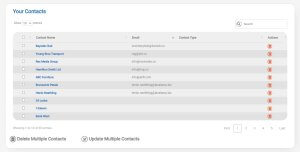
The code we are about to use will detect whether any of the checkboxes are being selected. By default, the buttons will be disabled and the saturation for the button icon and text will be 0%. When the checkbox variable is considered true, it will make the saturation 100%. If the variable is considered false, it will return the saturation back to 0%.
app.blade
<link rel="stylesheet" href="https://code.jquery.com/ui/1.12.1/themes/base/jquery-ui.css">

    <script src="https://code.jquery.com/jquery-1.12.4.js"></script>

    <script src="https://code.jquery.com/ui/1.12.1/jquery-ui.js"></script>

    <script>

        $.noConflict();

        jQuery(document).ready(function($) {


            $('input[type="checkbox"]').click(function(){

                var $checkbox = $(this);

                var bulkDelete = $('[id="contact_delete_button"]');

                var bulkDeleteText = $('[id="delete_contact"]');

                var bulkUpdateText = $('[id="update_contact"]');

                var bulkUpdate = $('[id="contact_update_button"]');

                var bulkUpdateIcon = $('[id="bulk_update_icon"]');

                var bulkDeleteIcon = $('[id="bulk_delete_icon"]');

                if($(this).prop("checked") == true){

                    console.log("Checkbox is checked.");

                    bulkDeleteText.css('color','#106DBD!important');

                    bulkDeleteText.css('font-family','Roboto');

                    bulkDeleteText.css('font-weight','600');

                    bulkUpdateText.css('color','#106DBD!important');

                    bulkUpdateText.css('font-family','Roboto');

                    bulkUpdateText.css('font-weight','600');

                    bulkUpdateIcon.css('filter','saturate(100%)');

                    bulkDeleteIcon.css('filter','saturate(100%)');

                    bulkDelete.css('pointer-events','auto');

                    bulkUpdate.css('pointer-events','auto');

                }

                else if($(this).prop("checked") == false){

                    console.log("Checkbox is unchecked.");

                    bulkDeleteText.css('color','#777777!important');

                    bulkDeleteText.css('font-family','Roboto');

                    bulkDeleteText.css('font-weight','600');

                    bulkUpdateText.css('color','#777777!important');

                    bulkUpdateText.css('font-family','Roboto');

                    bulkUpdateText.css('font-weight','600');

                    bulkUpdateIcon.css('filter','saturate(0%)');

                    bulkDeleteIcon.css('filter','saturate(0%)');

                    bulkDelete.css('pointer-events','none');

                    bulkUpdate.css('pointer-events','none');

                }

            });

        });

    </script>
When implementation has been completed, the screen should result in the following example:
2. Implementation of Bulk Delete
By adding a bulk delete functionality, it minimizes the time spent removing data instances. At this stage, we already have the necessary code to select our instances.
You will need to create a new public function that will be requested when clicking on the Bulk Delete button. In this example, the public function will be named deleteAll:
ClientController
public function deleteAll(Request $request){

    $data = array();

    $ids = (array) json_decode($request->data);

    $contacts = Contact::whereIn('id', $ids)->get();

    $deleteData = array(); // Array for contacts that don't have debit orders and payments

    foreach($contacts as $contact){

        $deleteData[] = $contact; // Populates deleteData array with contacts that doesn't consists debit orders and payments


    }

    // Deletes all contacts existing in deleteData array

    foreach($deleteData as $contact){

        $contact->delete();

    }

    // Provides validation message

    return redirect('/contact/view-contacts')->with('message', 'Contact deleted successfully.');


}
$ids is being used to retrieve all of the contact id values, which is present in the checkbox inputs we have added earlier. Once $ids have gathered all of the checkbox values, $contacts will then proceed to cross-reference the checkbox values with the ids stored in the database.
The function will then proceed to the foreach loop, where all of the values will populate the $deleteData array. This array will then be used in a second foreach loop, which will be responsible for the removal of the contacts.
Once the functionality has been implemented, you will need to ensure that you have added the URL for the functionality:
web
...
Route::group(['middleware' => ['auth'], 'prefix' => 'contact'], function () {
Route::post('delete-selected', 'ContactController@deleteAll')->middleware('user.expired');

});
...
3. Implementation of Bulk Update
The implantation for the bulk update is slightly more difficult to implement compared with the Bulk Delete, depending on how your system is implemented.
In the following code, you will need to create the following public functions:
ClientController
    public function bulkSelect(Request $request){

        $data = array();

        $ids = (array) json_decode($request->data);

        Session::put('contact_ids',$ids);

        return redirect('/contact/update-selected');

    }

    public function updateSelected(Request $request){

        $data = array();

        $contact_ids = $request->session()->get('contact_ids');

        $contacts = Contact::whereIn('id', $contact_ids)->get();

        $data['contacts'] = $contacts;

        return view("contact.bulk-update", $data);

    }
The bulkSelect public function is used to retrieve all of the selected values from the index screen and create a session of all the selected data. This data will be used for in the
updateSelected public function.
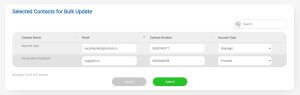
The updateSelected public function retrieves the session created from bulkSelect and proceeds to cross-reference the data with the contact ids stored in the database. When the ids have been found, they will be placed into an array, which will be used in a foreach loop on the bulk-update screen.
The following code is used to display the bulk-update screen’s DataTable and action buttons:
bulk-update.blade
    @extends('layouts.app')

    @section('content')

    <div class="container">

    <div class="row justify-content-center">

        <br />

        <div class="col-md-12 z-bottom">

            <div class="tab-content">

                <div id="contacts">

                    <div class="card">

                        <div class="row">

                            <div class="col-md-12 no-padding">

                                <div class="card-body">

                                <form name="contact-bulk-update" action="{{ url('/contact/update-all') }}" method="POST">

                                    @csrf

                                    <div class="col-6">

                                        <h3 class="float-left table-heading">Selected Contacts for Bulk Update</h3>

                                    </div>

                                    <br />

                                    <table id="bulk-update-contacts" class="table table-hover">

                                        <thead>

                                            <tr>

                                                <th>Contact Name</th>

                                                <th>Email</th>

                                                <th>Contact Number</th>

                                                <th>Account Type</th>

                                            </tr>

                                        </thead>

                                        <tbody>

                                            @if ($contacts)

                                            <?php

                                                $count = 0

                                            ?>

                                            @foreach ($contacts as $i => $contact)

                                            <tr>

                                                <td id="contact_name">

                                                    {{ $contact->business_name ?: $contact->first_name . ' ' . $contact->surname }}

                                                    <input type="hidden" name="contact_id[]" value="{{ $contact->id }}" readonly/>

                                                </td>

                                                <td>

                                                    <input

                                                        type="text"

                                                        name="email_address[]"

                                                        value="{{ $contact->email_address }}"

                                                        placeholder="Email Address"

                                                        class="form-control"

                                                    />

                                                </td>

                                                <td>

                                                    <input

                                                        type="text"

                                                        name="contact_number[]"

                                                        value="{{ $contact->contact_number }}"

                                                        placeholder="Contact Number"

                                                        class="form-control"

                                                    />

                                                </td>

                                                <td >

                                                    <select name="contact_type[]" class="form-control" >

                                                        <option value="" selected>Select Contact Type</option>

                                                        <option value="Manager" {{ $contact->type == 'Manager' ? 'selected' : '' }}>Manager</option>

                                                        <option value="Provider" {{ $contact->type == 'Provider' ? 'selected' : '' }}>Provider</option>

                                                        <option value="Delivery" {{ $contact->type == 'Delivery' ? 'selected' : '' }}>Delivery</option>

                                                    </select>

                                                </td>

                                            </tr>

                                            <?php

                                                $count++

                                            ?>

                                            @endforeach

                                            @endif

                                        </tbody>

                                    </table>

                                    <div class="form-group row mb-0 justify-content-center">

                                        <div class="col-6 text-right">

                                                    <input type="button" class="btn btn-secondary" value="Cancel" onclick="location.href='./view-contacts'">

                                        </div>

                                        <div class="col-6">

                                            <button type="submit" class="btn btn-primary" data-proxy-form="debit-order">

                                                {{ __('Submit') }}

                                            </button>

                                        </div>

                                    </div>

                                </form>

                                </div>

                            </div>

                        </div>

                    </div>

                </div>

            </div>

        </div>

    </div>

    @endsection
In this screen, the user will be able to view all of the contacts that they have selected and will be able to easily update the information. After the necessary code has been implemented, it should look like the following example:
If the user is satisfied with the updates they have made, they will need to click the Submit button. When the Submit button is clicked, the updated information will need to be saved to the database. To ensure this functionality would be properly executed, we will need to add the following public function:
ContactController
    public function updateAll(Request $request)

    {

            $ids = $request->input('contact_id');

            $email_addresses = $request->input('email_address');

            $contact_numbers = $request->input('contact_type');

            $contact_types = $request->input('contact_type');

            foreach($ids as $k => $id){

                $values = array(

                    'email_address' => $email_addresses[$k],

                    'contact_number' => $contact_numbers[$k],

                    'contact_type' => $contact_types[$k],

                );

                    DB::table('contacts')->where('id','=',$id)->update($values);

            }

        return redirect('/contact/view-contacts')->with('message', 'Contacts Updated Successfully');

    }
updateAll is used to request all of the changes that were made in the bulk-update screen. The values will be processed within a foreach loop, where the id of each input is added to a value array. Once that has been settled, the contact table will be updated with the values that the user has inputted.
Just like the Bulk Delete implementation, you will need to ensure that the public functions have been established in the web file:
Route::group(['middleware' => ['auth'], 'prefix' => 'contact'], function () {
Route::post('contact-selected', 'ContactController@bulkSelect')->middleware('user.expired');
Route::get('update-selected', 'ContactController@updateSelected')->middleware('user.expired');
Route::post('update-all', 'ContactController@updateAll')->middleware('user.expired')->name('contact.update');
}
I hope that this tutorial on creating a Bulk Delete and Update functionality assists you in creating a much desireable result for your project.


