





Set up a build configuration to easily switch between pre-defined layouts and data endpoints.
– Build configurations differ depending on the Angular version, so for this article I will be using Angular 12.
Environment files
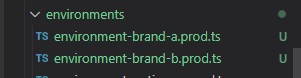
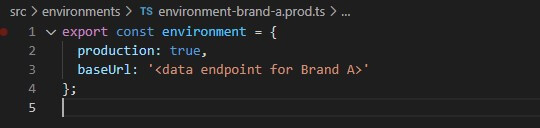
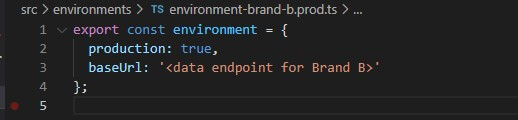
First lets create a new environment file (environment.ts) and change the naming of the files. That way we can easily determine which environment suits which build configuration.
Setting up different environment files is essential if you have different databases your front-end needs to communicate with based on the branding switch.
Stylesheet sets
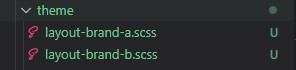
Next up is creating another set of CSS stylesheets and then naming them according to the environment files previously discussed (it will be easier to understand which stylesheet suites which brand/build). This will ensure each brand’s page styling is isolated in their respective stylesheet.
The configuration
The final step is to add another build configuration. In this case we will have at total of 2 variants specified in our projects’ angular.json file.
The build configuration ties your stylesheets and environment files together and will build your Angular project according to all those resources.
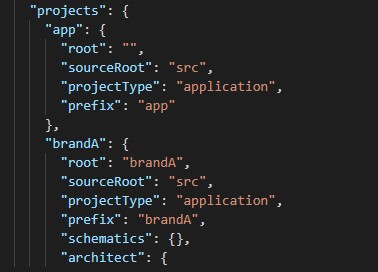
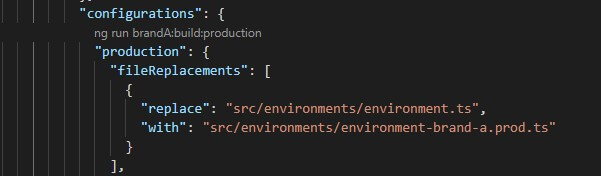
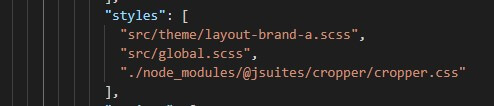
– Note: You can also duplicate your assets folder and name it accordingly. Keep the file names inside your different assets folders the same to ensure that you can reference the same file name in your html regardless of what build you are serving or building.
This eliminates the need for conditional templates in your view.
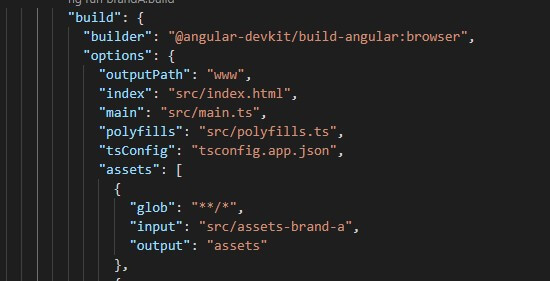
Result time
Lastly, run the build command, with some extra flags to ensure the correct build variant, and watch the magic happen.



