




Adding animation effects could be done in a number of ways, namely CSS/SASS or a library, but Angular could also do this plus the benefit of reusability and easy implementation.
Starting Point
Firstly we have to make sure we have the animations package installed (creating a new project usually has this added already).
Install the animations package:

npm install --save @angular/animations
Then just add the BrowserAnimationModule to you app’s main .module file.

Now the fun starts
Lets define an animation (I decided to create a separate module file to hold all my animation styles).
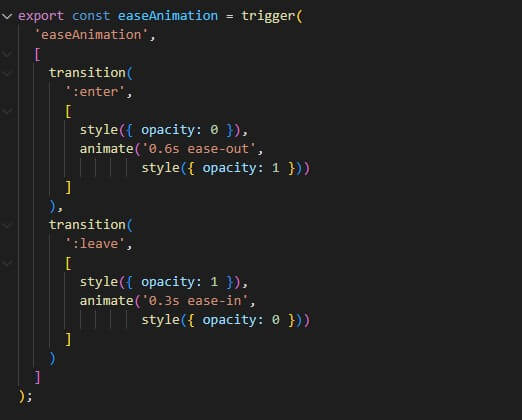
Note that I also had to import all the animation methods used in my logic.

All of these built-in methods all have an important task:
- trigger – accepts a name for the animation trigger and an array of state and transition methods to configure the animation.
- style – CSS styles to be applied.
- transition – specifies the configuration for transitioning between the different states and its direction.
- animate – specifies the duration and any additional CSS animation properties such as easing.
Let’s Implement
On the page/component I want to use my animation, import it into the component class;

and add it to the component decorator using the animations property.
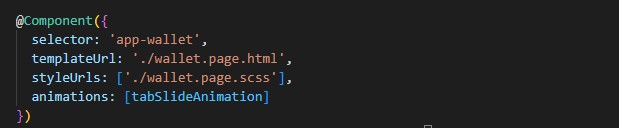
Now simply add this animation to any div or directive you would like to animate like so;

And that’s how easy it is to add animations in an Angular app.
Note how easy it would be to reuse this animation in a different component or event import and add more than one animation to the same component.


