

I’ve recently run into the following scenario; A Store needed to be linked to multiple Products. I could have added a store_id to the Products table, but then what if I wanted to use the Product elsewhere?
The solution was a Pivot table, linking a Store to a Product in a separate table.
Database
Starting off with the database structure, we’ll have to create both the Store and Product table, as well as the Pivot table. See below:
stores:
- id
- name
products
- id
- name
product_store:
- id
- product_id
- store_id
With “product_store” being the Pivot table.
Models
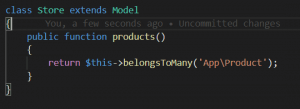
The Models need relationships to link the Store to the Product. This is a Many-to-many relationship, so our Models will reflect that. See below:
App\Store:
App\Product:
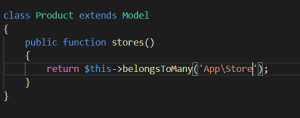
You have to define both the relationship and the inverse. Now that we have finished that, we can make use of the relationship.
Adding Products to Stores
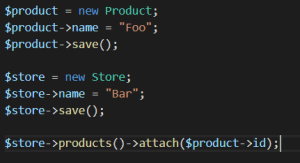
To start, we save data the same way we normally do. The only difference now is that we have to manually attach the product to the store. See below.